Laser vs Inkjet Printers for the Office: Which Is Right for You?
If you're setting up or upgrading an office printer, the laser-vs-inkjet decision is one of the first things to get right — and it isn't a matter of one technology being universally "better." Each is built differently, and each suits a different print profile. This guide compares them on the things that actually matter for an office — cost per page, speed, quality and maintenance — so you can match the right printer to how your team actually prints.
The core difference: how each technology puts ink on paper
A laser printer uses toner — a fine powder — fused onto the page with heat via a rotating drum and an electrostatic charge. Toner cartridges are rated for thousands of pages, which is what keeps a laser printer's cost per page low once you're printing at any real volume.
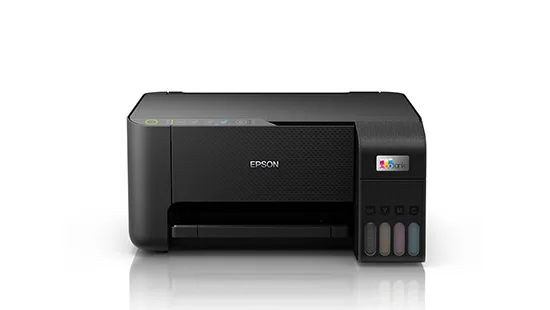
An inkjet printer sprays liquid ink through tiny nozzles directly onto the page. Traditional cartridge-based inkjets are cheap to buy but expensive to run, because their cartridges hold comparatively little ink. Modern ink-tank inkjets change that equation: instead of small cartridges, they refill from large ink bottles, which is what makes a model like the Epson L3250 genuinely competitive with laser on running cost — especially for colour.
Laser vs ink-tank inkjet: side by side
| Laser | Ink-tank inkjet | |
|---|---|---|
| Best suited to | Text-heavy documents — invoices, letters, reports | Mixed colour/text documents, marketing materials, photos |
| Running cost at volume | Low cost per page once toner is in place | Low cost per page after tank refill; strong for colour-heavy printing |
| Upfront cost | Often higher for colour laser models | Generally lower entry price |
| Speed | Faster for high-volume mono printing | Slower per page, especially in colour or duplex |
| Warm-up | Near-instant first page | Similar on modern models, though older cartridge inkjets can lag |
| Print quality | Crisp, consistent text; solid for charts/graphics | Better colour blending and photo-realistic output |
| Maintenance | Toner swap, occasional drum/fuser service | Ink tank refills; print heads need occasional attention |
Cost per page matters more than the sticker price
The single biggest mistake offices make is comparing two printers on purchase price alone. A cheap inkjet with small cartridges can end up costing far more over a year of steady printing than a laser printer that costs more upfront, simply because of how often — and how expensively — you're replacing consumables. When you're comparing options, ask your supplier for the expected page yield of the toner or ink your team will actually use, and work out the running cost for your real monthly volume, not just the box price.
This is exactly why ink-tank inkjets exist: they take the print-quality strengths of inkjet — rich colour, photo-quality output — and remove the worst of the traditional per-page cost problem, by replacing small cartridges with refillable bottles. The Epson L3250 and Epson L4260, both A4 colour ink-tank all-in-ones in Bititec's range, are built around exactly this model.
Speed and volume: where laser usually wins
If your office is mostly printing text — invoices, contracts, reports, forms — a mono laser MFP will usually be faster and better suited to sustained daily volume. The HP LaserJet Pro MFP 4103fdw, for example, prints at around 40 ppm with duplex speeds of up to 34 images per minute and a first page out in as fast as 6.3 seconds — the kind of speed a busier office notices immediately in a print queue. For a smaller team or lower-volume office, something like the HP LaserJet MFP 135w — a compact mono laser MFP rated for up to 10,000 pages a month — covers day-to-day printing without over-buying capacity you won't use.
Kyocera's Ecosys range takes a different angle on the same laser strengths: the Ecosys M2640idw prints at around 40 ppm and is built around Kyocera's long-life drum technology, designed to keep running costs low over a long service life rather than requiring frequent drum replacement.
Inkjets — even ink-tank ones — are rarely the first choice for high daily volume. They're a better fit where colour quality matters more than raw throughput.
Print quality: text vs colour
For plain text, laser is hard to beat — toner produces sharp, consistent characters even at small font sizes, run after run. For colour work — charts, marketing materials, product images — a good ink-tank inkjet like the Epson L3250 (up to 33 ppm mono / 15 ppm colour in draft mode) can produce noticeably richer, smoother colour blending than a colour laser at a comparable price point. If your office prints mostly black-and-white text with the occasional colour page, a mono laser plus a separate low-volume colour option is often more cost-effective than buying one machine to do both jobs well.
Maintenance and day-to-day reliability
Laser printers are generally lower-maintenance day to day: swap the toner when it's out, and the machine keeps going with occasional attention to the drum or fuser over its life. Ink-tank inkjets need their tanks refilled and, occasionally, their print heads cleaned or realigned if they've sat unused for a while — not a major task, but worth knowing about if a printer goes quiet for weeks at a time between print runs.
Whichever technology you choose, keeping a printer serviced matters more than the brand on the box. If something does go wrong, Bititec's printer repair service covers all major brands and models, laser and inkjet alike, with genuine parts and a 24-hour response target.
Which should your office choose?
As a rule of thumb:
- Choose laser if your office prints mostly text at meaningful volume — invoices, contracts, reports — and wants fast, low-fuss daily printing.
- Choose ink-tank inkjet if colour quality matters and your volume is moderate — marketing materials, presentations, mixed documents where photo-realistic colour is worth the trade-off in raw speed.
- Consider both, if your office has genuinely different needs across departments — a laser MFP for the general office, and an ink-tank machine for whoever produces client-facing colour work.
Frequently Asked Questions
Is laser cheaper than inkjet in the long run? For high-volume, mostly-text printing, laser toner typically yields a lower cost per page than traditional cartridge inkjets. Modern ink-tank inkjets close much of that gap, particularly for colour printing, because they refill from bottles rather than small cartridges.
Which is better for a small office with light printing? A compact mono laser MFP, such as the HP LaserJet 135w, suits light-to-moderate text printing well. If your small office prints a lot of colour — flyers, certificates, mixed documents — an ink-tank model like the Epson L3250 is worth comparing on running cost.
Can one printer handle both text and colour well? Colour laser MFPs exist and handle both reasonably, but tend to cost more upfront than a mono laser. Many offices instead run a mono laser for day-to-day text and a separate ink-tank or colour device for occasional colour work — worth discussing with your supplier based on your actual mix of print jobs.
Ready to choose the right printer for your office?
Browse Bititec's full range of office printers — including the HP LaserJet 4103fdw, HP LaserJet 135w, Kyocera Ecosys M2640idw, and Epson L3250 — or get in touch and our team will help you match a printer to your actual print volume and budget.
Talk to Bititec Systems about equipment, leasing or managed print for your office.
Contact Bititec Systems →

Kenya's trusted supplier of office electronics, printers, copiers, and KRA-approved eTIMS/ETR machines — with branches in Nairobi, Mombasa, Embu, and Meru.
© 2026 Bititec Systems & Supplies Limited. All rights reserved.