How to Choose the Right Office Photocopier in Kenya (Speed, Volume & Cost)
Photocopiers all look broadly similar in a showroom, but the wrong choice for your office shows up fast — in slow queues at the machine, in toner bills that don't match what you expected, or in a machine that simply can't keep up with your paper size or volume. This guide walks through the factors that actually matter, in the order most offices should think about them.
Step 1: Work out your real monthly volume
Before comparing any spec sheet, estimate how many pages your office actually prints and copies in a typical month. This single number does more to narrow your options than any other factor — it determines the class of machine you should even be looking at, and it's the figure any supplier will ask for before quoting a lease rate. If you're not sure, a rough count over one or two weeks (multiplied out to a month) is far more useful than guessing.
Step 2: Colour or mono?
Colour photocopiers cost more to run than mono machines, page for page, because colour toner is more expensive and colour print heads see more wear. The honest question to ask is: how much of what we print actually needs to be in colour? Internal reports, contracts and everyday paperwork rarely do. Client-facing materials, presentations and marketing collateral often do. Many offices are well served by a mono workhorse for daily volume, with colour reserved for a smaller secondary machine or occasional use.
Step 3: A3 or A4?
If your office regularly prints or copies anything larger than standard letter/A4 paper — architectural drawings, spreadsheets, posters, or documents that need to be laid out across a bigger sheet — you need an A3-capable machine. If everything you handle is standard A4 paperwork, an A4-only machine is usually cheaper to run and takes up less space. Don't pay for A3 capability you'll never use.
Step 4: Speed (pages per minute)
Print speed, measured in pages per minute (ppm), matters more as your office gets busier. A machine rated around 20–28ppm suits a small-to-medium office with moderate daily use. Offices with several people queuing at the machine, or with regular large print runs, benefit from something in the 35ppm-and-up range so a big job doesn't hold up everyone else.
Step 5: Functions you actually need
Most modern office photocopiers are multifunction devices, but the exact function set varies:
- Print, copy, scan — the baseline most offices need
- Fax-ready — still relevant for some institutions (schools, government offices, law firms) even though usage has declined generally
- Finishing options (stapling, sorting) — useful for offices producing multi-page documents regularly
- Touch panel size and usability — a larger colour touchscreen speeds up daily operation, especially where several staff share the machine
Step 6: Running costs and consumables
The purchase price of a photocopier is only part of the real cost. Toner, drums and developers are consumed continuously, and how easily (and affordably) you can source genuine consumables for a given model matters over the machine's life. This is one of the reasons buying from an established supplier who also stocks consumables and offers servicing matters — a great machine with hard-to-source parts becomes a headache within a year.
Comparing your shortlist
Once you've narrowed things down by volume, colour need and paper size, compare your shortlist side by side:
| Factor | What to check |
|---|---|
| Monthly duty cycle | Is the machine rated comfortably above your actual monthly volume? |
| Speed | Does ppm match how many people queue at the machine daily? |
| Paper size | A3 only if you actually need it — otherwise A4 is more economical |
| Functions | Print/copy/scan as standard; fax and finishing only if genuinely used |
| Consumables availability | Can you buy toner, drums and developers locally and reliably? |
| Support | Does the supplier offer servicing, repairs and genuine parts in your area? |
Models worth considering
Bititec supplies photocopiers from major brands including Kyocera, Konica Minolta (Bizhub), Sharp and Ricoh. A few models worth a look, depending on your profile:
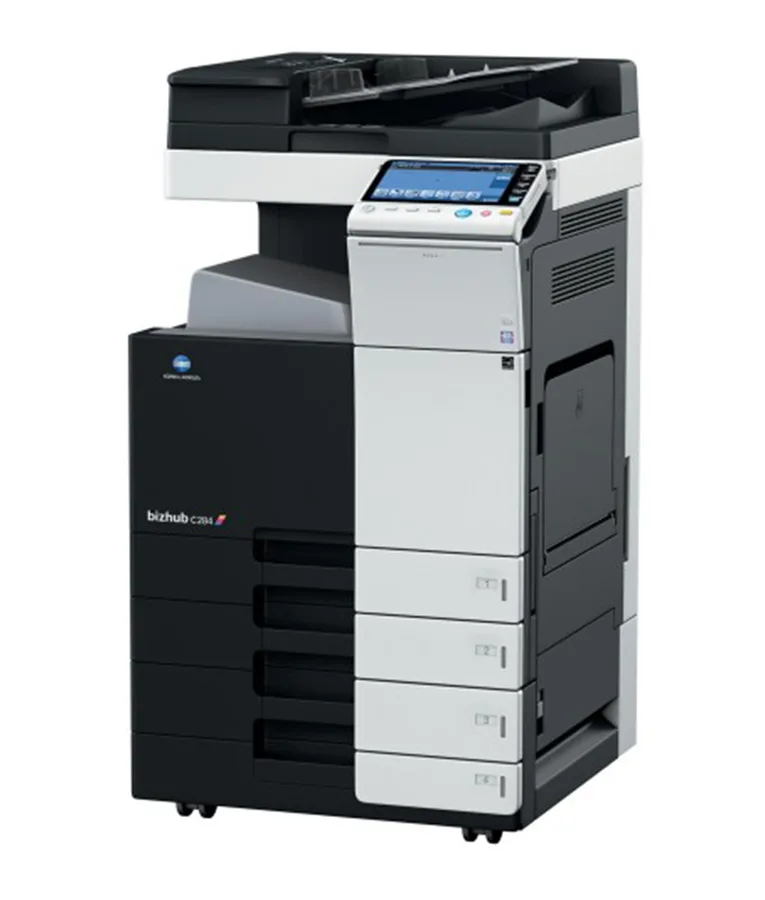
- Konica Minolta Bizhub C284 — an A3 colour workhorse printing around 22–28 pages per minute with a 7-inch touch panel, internal HDD, and finishing options. A solid fit for medium-to-large offices that need dependable daily colour output.
- Kyocera TASKalfa 3511i — an A3 mono multifunction printing around 35 pages per minute, with a large colour touch panel and high paper capacity. A strong choice for busier offices with mostly mono volume, and it's available to buy, hire or lease.
- Kyocera Ecosys MA4500X — an A4 mono laser MFP printing around 45ppm for straightforward everyday print, copy and scan needs, suited to smaller offices or departments that don't need A3.
See the full range on the Photocopiers category page, where you can compare specs and check current availability.
Should you buy or lease it?
Once you know which machine fits your volume and needs, the next decision is how to pay for it — buying outright or an all-inclusive cost-per-copy lease. We cover that trade-off in detail in Photocopier Lease vs Buy in Kenya, including what a Bititec lease includes and when each option tends to work out cheaper.
Don't forget servicing
Whichever machine and payment route you choose, plan for servicing from day one rather than waiting for a breakdown. Bititec's printer & photocopier repair service covers all major brands with on-site diagnosis, genuine parts, and optional annual maintenance contracts for ongoing cover — worth having lined up before you need it.
Frequently Asked Questions
How do I estimate my office's monthly print volume if I've never tracked it? Count pages printed and copied over one or two representative weeks, then multiply out to a monthly figure. It won't be exact, but it's far more useful for sizing a machine than guessing, and most suppliers will help refine it during a consultation.
Do I need A3 if I only occasionally print larger documents? Not necessarily — if large-format printing is rare, it may be cheaper to send those occasional jobs out or use a shared A3 machine elsewhere, rather than paying for A3 capability on your primary daily machine.
Which brands does Bititec supply? Kyocera, Konica Minolta (Bizhub), Sharp and Ricoh, among other major brands, across A4 and A3, mono and colour ranges.
Ready to choose your next photocopier?
Browse the full Photocopiers range, or get in touch and Bititec's team will help match a machine — and a buy-or-lease plan — to your office's actual volume.
Compare photocopiers from Kyocera, Konica Minolta, Sharp and Ricoh, and get a recommendation for your office's volume.
Browse Photocopiers →

Kenya's trusted supplier of office electronics, printers, copiers, and KRA-approved eTIMS/ETR machines — with branches in Nairobi, Mombasa, Embu, and Meru.
© 2026 Bititec Systems & Supplies Limited. All rights reserved.