Best Laptop for Business in Kenya: A Buyer's Checklist
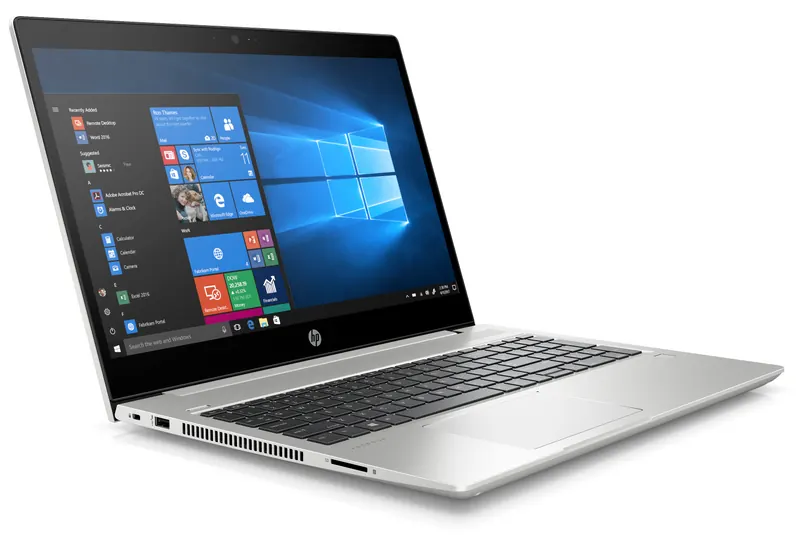
"Best laptop for business" is a genuinely hard question to answer with a single model, because the right laptop depends entirely on what the business actually does with it. A law firm drafting documents all day has different needs from a finance team running spreadsheets with dozens of tabs open, or a field team that needs a machine to survive being packed in and out of a bag every day. This checklist walks through the factors that actually matter, so you can match a laptop to the job rather than just picking whatever's cheapest or most talked-about.
Start with the use case, not the spec sheet
Before comparing processors and RAM, it helps to be honest about what the laptop needs to do:
- Everyday office work — email, browsers, documents, video calls. Doesn't need much horsepower, but does need reliability and battery life.
- Heavier multitasking — multiple applications, large spreadsheets, many browser tabs, or light data work. Benefits from more memory and a faster processor.
- On-the-go / field use — sales teams, auditors, staff who travel between sites. Battery life and physical durability matter more than raw performance.
- Executive / client-facing use — build quality, screen quality and security features (like on-device protection) often matter as much as performance.
Once you know which of these describes your team, the spec checklist below gets a lot easier to apply.
The core checklist
Processor and memory
For everyday office productivity, a mid-range processor with 8GB of RAM is usually enough. For heavier multitasking — many applications and browser tabs open at once — stepping up to a higher-tier processor and 16GB or more of RAM avoids the slowdowns that come with skimping here. Memory is one of the cheapest ways to extend a laptop's useful life.
Storage
An SSD (solid-state drive) is the baseline for any business laptop today — it's dramatically faster than older mechanical drives for boot times and loading applications. 512GB is a comfortable amount for most office use; teams working with large files or local datasets may want up to 1TB.
Display
Screen size and resolution affect eye strain and productivity more than people expect. A Full HD (FHD) display is the practical minimum for comfortable all-day use; a sharper 2K panel is a worthwhile upgrade for anyone doing detailed visual work. A 16:10 aspect ratio (taller than the older 16:9 standard) gives more vertical space for documents and spreadsheets, which is a small but genuinely useful detail for office work.
Battery life
For anyone who isn't tied to a desk all day, real-world battery life matters more than the manufacturer's peak-rated number. Look for fast-charge support too — a battery that can top up to 50% in around half an hour is a meaningful convenience for staff who travel between meetings or sites.
Durability and build
Business-grade laptops are typically built to different durability standards than consumer models — sturdier hinges, more robust chassis materials, and better tolerance for the daily wear of being packed, unpacked and carried. If a laptop is going to live in a bag and travel with someone regularly, this matters more than most spec-sheet numbers.
Security
For business use, look for hardware-level security features — protections that operate below the operating system, not just antivirus software — plus standard features like fingerprint or facial login. This matters more for laptops that handle sensitive client or financial data.
Warranty and support
A laptop is only as good as the support behind it when something goes wrong. Confirm what's covered under manufacturer warranty, and whether local servicing and genuine parts are available — a machine that has to be shipped out of the country for repair is a real operational risk for a business fleet.
Comparing the checklist against real specs
Here's how those checklist items map onto a few actual configurations, to make the trade-offs concrete:
| Checklist item | Entry-level everyday laptop | Mid-range business laptop | Premium business laptop |
|---|---|---|---|
| Typical use case | Basic office tasks, browsing, calls | Everyday productivity, some multitasking | Client-facing, security-sensitive, heavier multitasking |
| Processor tier | Entry-level | Mid-range | High-end |
| Memory | 8GB | 8–16GB | Up to 16GB+ |
| Storage | 512GB SSD | 512GB–1TB SSD | Up to 1TB SSD |
| Display | FHD, 14"–17.3" | FHD, 15.6" (optional touch) | Sharp WUXGA/2K, 14" |
| Standout feature | Affordable, dependable | Long battery life (up to 13 hrs) | Hardware-level security, on-device AI |
What Bititec supplies
Bititec is a corporate laptop supplier in Kenya, stocking business laptops from HP for bulk purchase, campus deployments, and individual office use. Current models in the HP business range include:
- HP EliteBook 840 — a premium 14" business laptop with HP Wolf Security's below-the-OS protection, aimed at fleets that want a durable, security-hardened everyday machine.
- HP ProBook 450 — a 15.6" business laptop with up to 13 hours of battery life, a practical, full-size choice for everyday office productivity.
- HP ProBook 440 — a compact 14" business laptop with fast-charge battery support, a budget-conscious step below the EliteBook range.
- HP OmniBook 5 — a mid-range laptop with sharper 2K displays and on-device AI features, available in 14" and 16" configurations.
- HP OmniBook 3 — an entry-level everyday laptop spanning 14" to 17.3" screens, suited to straightforward browsing, documents and calls.
You can browse the full laptop range to compare current configurations side by side.
Buying in bulk for a team
For businesses fitting out a whole team or department, buying laptops one at a time from a retail shelf rarely makes sense — pricing, configuration and delivery timelines all work differently at volume. Bititec supplies laptops for bulk and corporate purchase, so a team can standardise on the same model (or a small set of models matched to different roles) and order them together rather than piecemeal. If you don't see the exact configuration you need on our product pages, our team can often source it — get in touch and we'll help you spec out the right fleet.
Frequently Asked Questions
What's the minimum spec I should buy for a business laptop? For everyday office work, an SSD, 8GB of RAM and a Full HD display are a sensible baseline. If your team multitasks heavily or works with large files, step up to 16GB of RAM and a faster processor.
Does Bititec sell laptops for bulk/corporate purchase? Yes — Bititec supplies business laptops for bulk purchase, corporate fleets and campus or home use, alongside the printers, photocopiers and other office equipment we're known for.
What brands of business laptop does Bititec stock? Our current laptop range is built around HP's business lineup — EliteBook, ProBook and OmniBook — covering everyday, mid-range and premium use cases.
Ready to fit out your team?
Browse the full range of business laptops, or contact our team to talk through bulk pricing and the right configuration for your office.
Talk to Bititec Systems about equipment, leasing or managed print for your office.
Contact Bititec Systems →

Kenya's trusted supplier of office electronics, printers, copiers, and KRA-approved eTIMS/ETR machines — with branches in Nairobi, Mombasa, Embu, and Meru.
© 2026 Bititec Systems & Supplies Limited. All rights reserved.